
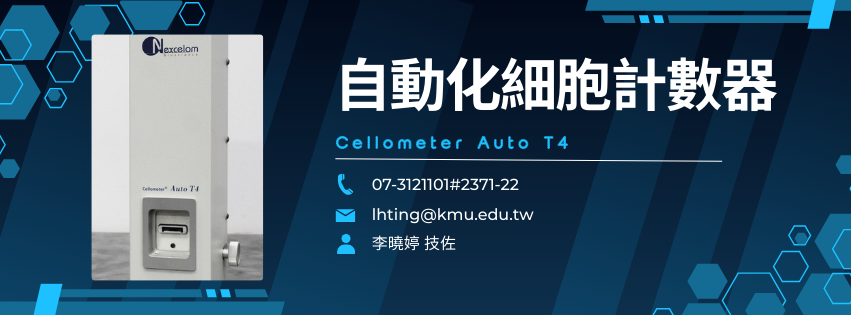
儀器功能 / Instrument Functions
儀器概述 / Instrument Overview
-
Cellometer Auto T4 是一款高效能、自動化的細胞計數與活性評估系統,結合影像辨識與專用螢光/明場成像技術,可快速準確地量化細胞數目、活性與大小分佈。其操作簡便且分析速度快,非常適合需大量樣本細胞計數、動力學分析或短時間內完成多樣測試的實驗流程。
The Cellometer Auto T4 is a high-performance automated cell counting and viability assessment system. By integrating advanced imaging and fluorescence/brightfield detection, it rapidly and accurately quantifies cell number, viability, and size distribution. Its user-friendly interface and fast processing make it ideal for workflows requiring high throughput cell counts and quick turnaround analyses.
功能與應用 / Functions & Applications
-
自動細胞計數:可在幾十秒內完成細胞數目與活性評估。
Automated cell counting: Completes cell number and viability assessment in seconds. -
活性/死細胞判別:搭配染色(如 Trypan Blue、AO/PI),準確區分活細胞與死細胞比例。
Viability discrimination: Differentiates live and dead cells with dyes such as Trypan Blue or AO/PI. -
大小分佈分析:提供細胞大小與分佈資料,有助細胞狀態與群體特性評估。
Size distribution analysis: Provides cell size and distribution metrics to assess sample heterogeneity. -
高通量樣本處理:儀器支援多孔板或單一樣本快速切換,適合大樣本量實驗。
High-throughput sample handling: Supports rapid switching between samples, suitable for large studies. -
多細胞類型適用:適用於各類哺乳動物細胞、血液細胞、原代細胞與懸浮細胞等。
Broad cell compatibility: Applicable to various cell types including mammalian, blood, primary, and suspension cells.
分析與數據 / Analysis & Data
-
精準計數與活性評估:利用影像分析演算法,提供細胞密度、活性比例及細胞大小資訊。
Accurate count and viability assessment: Uses image analysis algorithms to report cell density, viability percentage, and size information. -
影像即時呈現:分析過程可視化顯示細胞影像與計數結果,便於確認品質。
Real-time image display: Visualization of cell images during analysis for immediate quality confirmation. -
多模式檢測:支援明場與螢光模式,可選配不同染劑進行細胞群體或亞群辨識。
Multi-mode detection: Supports brightfield and fluorescence modes with optional dyes for population or subpopulation analysis. -
報表與數據輸出:可產生統計圖表、原始數據與報表,方便後續分析與紀錄。
Reports and data export: Generates statistical charts, raw data, and reports for downstream analysis and documentation. -
使用者友好介面:直覺式操作流程及預設參數,使研究人員快速上手。
User-friendly interface: Intuitive workflow and pre-set parameters allow rapid adoption.
儀器放置地點 / Location
- 國際學術研究大樓 八樓 IR801室 - 蛋白質體核心研究室
International Research Building, 8th Floor, Room IR801 – Proteomics Core Laboratory.
申請流程 & 注意事項 / Application & Notes
-
本儀器須經管理人員教學認證通過,並申請帳號後,方可自行預約操作。
Users must complete training and obtain certification from the administrator, and apply for an account before they may independently reserve and operate this instrument. -
超過預約時間十五分鐘仍未上機者,視為放棄使用本台儀器。其他使用者經管理人員同意後可使用本儀器。
If a user has not started using the instrument within 15 minutes of the reserved time, the reservation will be considered forfeited. With the administrator’s approval, other users may then use the instrument. - 使用完畢後需保持儀器乾淨清潔,並通知管理人員到場檢查確認後,方能離開。
After use, the instrument must be kept clean. Users may leave only after notifying the administrator to inspect and confirm the instrument’s condition.
- 儀器發生故障時,請儘速通知管理人員,勿自行拆裝儀器或任意調整儀器參數。
If the instrument malfunctions, please notify the administrator immediately. Do not disassemble the instrument or alter its settings on your own.
- 因個人因素操作不當造成儀器損壞,須由個人所屬實驗室負擔維修相關費用。
If improper operation due to personal negligence causes damage to the instrument, the user’s laboratory shall be responsible for the related repair costs.
- 若於非上班時間使用儀器,請先向管理人員申請門禁進入許可,並於使用完畢後確認儀器正常關機,及確實關閉門禁。
If the instrument is used outside office hours, users must first obtain access permission from the administrator. After use, they must ensure that the instrument is properly shut down and that the access-controlled door is securely closed.
注意事項 / Notes
📄 下載申請表 / Download Form
使用收費標準 / Fees
校內使用者 / Internal Users: 150元/片
校外使用者 / External Users: 240元/片
育成中心進駐廠商 / Incubation Center Tenant: 300元/片